


Patient Gateway
4.41.23K Reviews
App Specs
- Version
- 11.5.100
- Updated On
- License
- Free
- Downloads
- 100,000+
- Developer
- Mass General Brigham, Inc
- Categories
- Medical
- Platform
- Android
Screenshots
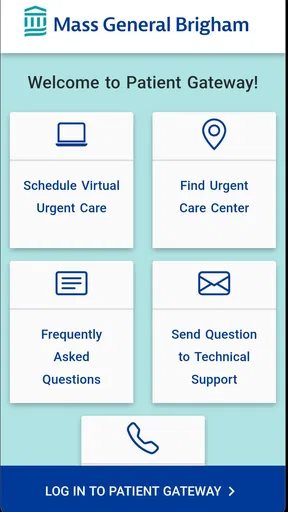
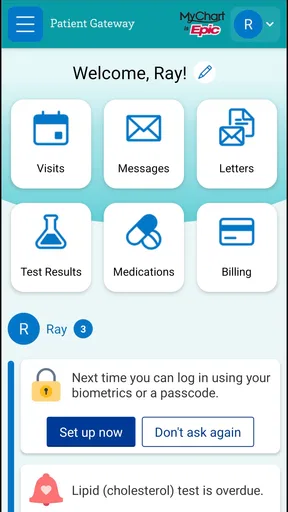
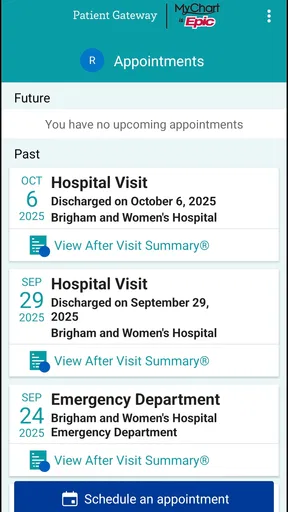
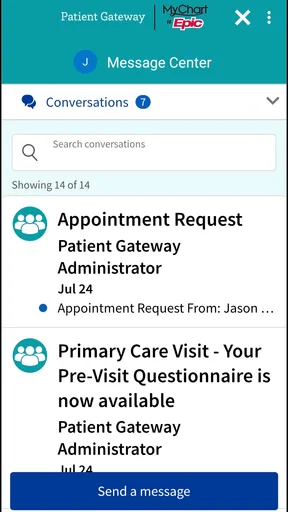
 Analysis by AppCompare
When I need to deal with a routine healthcare task, the difficult part is often not the medical question itself. It is finding the right place to check a message, review information, or contact the office without starting from scratch. Patient Gateway is built for that gap. Developed by Mass General Brigham, Inc, this free medical app gives patients a mobile route to view health information and communicate with their doctor. After using it as a practical patient-portal companion, I found it most useful when I treated it as a bridge between appointments rather than as a replacement for care.
That distinction matters. The app is aimed at people who already interact with a participating healthcare organization and want a more convenient way to manage that relationship. It is not a general medical encyclopedia, a symptom checker, or an emergency service. Its value comes from keeping patient-to-clinic communication closer at hand, especially when opening a browser on a phone feels unnecessarily slow.
Patient Gateway has been available since March 16, 2017, and its current version is 11.5.100. It is listed for Everyone and supports Android 9 or later. Those details make it accessible to many ordinary phone users, including people who do not want a complicated health-management tool. The app has a 4.4 average from around 2.5 thousand ratings, with over 100 thousand installs, which suggests a meaningful user base without turning popularity into a promise that every patient experience will be identical.
From a healthcare question to a useful next step
I find Patient Gateway most useful when a health question has a clear next step: checking what is already available, then deciding whether I need to contact the office. That approach helps me avoid turning a quick check into a long, unfocused session. It also makes the next part of the review easier to judge: how well the app fits into the busier moments when several patient-portal tasks compete for attention.
Starting with the situation that actually brings you in
A realistic use case is a patient who has just left an appointment and later realizes that a detail needs clarification. Maybe the question is about information already discussed, a follow-up message, or something connected to the patient’s ongoing record. The usual alternatives are searching through old email, calling the main office, waiting on hold, or opening a desktop browser to find the correct patient-portal page.
Patient Gateway makes more sense when the starting point is already connected to your care team. I would open it with a specific goal rather than browse aimlessly: check the latest available health information, look for a message, or send a question to the doctor’s office. That narrow purpose keeps the experience manageable and reduces the temptation to interpret every piece of information without context.
The first practical check is whether your healthcare relationship is supported and whether your account is ready to use. A patient portal app cannot create a clinical connection that does not exist. If your office does not use the relevant system, the app will not become useful simply because it is installed. This is one of the most important trade-offs: the convenience is strong inside the connected care network, but limited outside it.
Worth Reading Before You Choose

EA SPORTS FC Mobile 26 Is a Bigger Football Game, but It Takes Time

Flipboard Shows What News Apps Must Do Beyond the Feed

Switching to Android Auto Means Rethinking Your Driving Routine

Google Calendar Makes a Crowded Week Easier to Manage

Ludo King Makes the Most of the Minutes Between Plans

Baby Panda World Brings Quick Play to Modern Phones, but Its Game Library Feels Busy
I also recommend treating account access as part of the workflow, not as an afterthought. Health information is more sensitive than a shopping list, so using the app on a shared or unlocked phone deserves care. I would avoid saving access details where another person can easily reach them, and I would check that I am viewing the correct account before acting on a message or record.
Moving through the app without losing the purpose
Once inside, the most useful habit is to separate information gathering from communication. I first review what is already available, then decide whether a message is actually necessary. That small pause prevents a common portal mistake: asking the office to repeat something that is already visible, or sending a vague note that creates another round of clarification.
For example, if I am checking information after an appointment, I would read the relevant entry carefully and note the exact point that remains unclear. If I need to contact the doctor, a focused message is more helpful than “I have a question.” Including the subject, the context, and what answer I need gives the receiving office a better starting point. The app provides the channel; the quality of the handoff still depends on how clearly I use it.
This is where Patient Gateway feels more practical than relying on ordinary email. A personal inbox mixes healthcare with receipts, newsletters, and unrelated conversations. A patient portal keeps the task closer to the clinical relationship, which makes it easier for me to remember why I opened it and what outcome I am waiting for. It also avoids guessing which general email address belongs to the right department.
At the same time, I would not assume that opening the app means a doctor is watching the screen in real time. A portal message is still a non-urgent communication. If a situation feels severe, rapidly changing, or immediately dangerous, a medical professional or emergency service is the appropriate route. Patient Gateway is best for the ordinary administrative and follow-up space between visits, not for urgent decisions.
The handoff from patient to healthcare office
The most important part of this app is the handoff. I write the question, submit it through the patient-portal channel, and then the next step belongs to the care team. That division of responsibility is easy to overlook because a phone interface can make communication feel instant. In reality, the app organizes the conversation; it does not remove the need for office staff or clinical review.
A good handoff includes enough detail to avoid a needless back-and-forth while staying focused. I would identify the relevant appointment or health concern, explain what I already understand, and state the decision or clarification I need. I would not use a portal message to send a long personal history unless the office specifically asks for it. Short, organized communication is easier to process and more likely to produce a useful reply.
Another useful workflow is to use the app as a record of what I have already communicated. Instead of calling one department and then trying to remember the conversation later, I can keep the portal exchange associated with the patient relationship. That can be valuable when several steps follow an appointment. It gives me a clearer trail of the question I asked and the answer I received, although I still need to read each response rather than assume the latest message resolves everything.
This is also where the app compares favorably with a paper notebook or scattered screenshots. Those methods can help me remember personal notes, but they do not provide the same direct route to the doctor’s office. On the other hand, a portal is not automatically better than a phone call for every handoff. If the issue requires immediate clarification, involves a complicated conversation, or is difficult to explain in writing, speaking with the office may be more efficient.
Turning the exchange into an outcome
The outcome I want is not merely a sent message. It is a completed next step: understanding information, knowing what to do next, or confirming that the office has addressed the question. Patient Gateway supports that process by putting the relevant patient-portal interaction on a phone, but I still have to close the loop.
My preferred routine is simple. I open the app with one purpose, review the available information, write a precise message if needed, and return later to check the response. If the reply changes what I need to do, I make a personal note of that action rather than relying on memory. This turns the app from a passive archive into a small part of an organized healthcare routine.
The strongest benefit is continuity. Instead of treating every appointment as an isolated event, I can use the same channel to revisit information and communicate afterward. That is particularly helpful for people who manage several appointments, support a family member, or find phone calls difficult during work hours. The app does not solve every coordination problem, but it can reduce the friction of getting back to the right clinical relationship.
It is also worth being realistic about what “view health information” means in daily use. The app is useful for accessing what has been made available through the patient portal, but I would not treat a screen as a complete interpretation of my health. Medical information can be technical, incomplete without context, or easy to misunderstand. When the result affects treatment or a major decision, the right outcome is often a clearer conversation with a qualified professional rather than a conclusion drawn from the app alone.
Where the workflow breaks down
The first break can happen before the app is useful: account setup, access problems, or an unsupported healthcare connection. A mobile portal may be convenient once everything is aligned, but it cannot remove organizational boundaries. If I regularly receive care from several unrelated systems, Patient Gateway may cover only part of my healthcare life, while separate portals create a fragmented experience.
The second break is communication delay. The app gives me a direct-looking route to the office, but that should not be confused with live chat. For a non-urgent question, waiting for a response may be reasonable. For something time-sensitive, I would choose a more immediate channel. This limitation is not a flaw unique to Patient Gateway; it is a basic consequence of using asynchronous healthcare communication, but the app’s simplicity can make that distinction easy to forget.
A third problem is interpretation. A patient who wants instant explanations of symptoms, test results, or medical terminology may be disappointed if the portal experience mainly provides access and messaging rather than a full educational consultation. In that situation, a dedicated medical reference tool or a conversation with a clinician may be a better companion. I would use Patient Gateway to reach the care team, not to replace professional judgment.
There is also everyday phone friction. Reading detailed health information on a small screen is less comfortable than using a computer, especially when I need to compare several entries or write a longer message. The mobile format wins for quick checks and short communication, but a desktop browser can be the better choice for a careful review session. Installing the app does not mean the phone is always the ideal device.
Finally, the app is not the right choice for someone looking for broad health tracking, fitness coaching, medication reminders, or a general symptom-analysis experience. Its focus is the patient-portal relationship. That focused design is a strength for the intended audience, but it also means I would skip it if my main goal were personal wellness monitoring rather than communication with a doctor and access to connected health information.
Who will get the most from it
I would recommend Patient Gateway to patients who already use the associated healthcare environment and want a straightforward mobile route to their health information and doctor’s office. It is especially suitable for people who dislike phone queues, need to revisit appointment-related details, or want a more organized alternative to ordinary email.
It can also help a busy caregiver coordinate questions more deliberately, provided the account and access arrangements are appropriate. The useful insight here is that the app works best when paired with a personal communication system: one clear question per message, a note of the next action, and a reminder to check the response. Without that discipline, a portal can become another inbox that I open without knowing what I am trying to finish.
I would be more cautious about recommending it to someone who expects immediate replies, wants one universal portal for every provider, or needs extensive health-management tools. Those expectations point toward a phone call, a desktop portal, or a different type of medical app. Patient Gateway is not trying to be all of those things, and judging it by those standards would miss its actual purpose.
My final take after following the full workflow
Patient Gateway is a focused, free medical app that makes the most sense when a patient starts with a real question, checks the information already available, and uses the doctor-communication channel carefully. I like it because it places an important healthcare handoff closer to the moment when I need it, without forcing me to search through unrelated email or remember a complicated web address.
Its limitations are equally clear: access depends on the connected healthcare relationship, messages are not emergency communication, and a phone screen cannot replace clinical explanation. Those are not reasons to dismiss it; they are boundaries to understand before relying on it.
My recommendation is simple: use Patient Gateway as a practical bridge between appointments, not as a substitute for medical care. For the right patient, that bridge can make follow-up less scattered and ordinary communication easier. For someone seeking instant answers, universal coverage, or a complete personal health dashboard, another option will likely fit better.
Pros
- Secure access to appointments
- test results
- and medical records in one place.
- Makes prescription refill requests convenient without calling the clinic.
- Supports messaging with care teams for non-urgent questions.
- Family access features can help caregivers manage a loved one’s care.
- Useful health reminders and updates can keep patients informed.
Cons
- Some features depend on whether your healthcare provider supports Patient Gateway.
- Messages may not receive immediate replies
- so it is not for emergencies.
- Login and identity verification can feel lengthy during initial setup.
- Medical information may take time to appear after a visit or test.
- The interface and available tools can vary between participating providers.
FAQs for Patient Gateway
What is Patient Gateway used for?
Patient Gateway is a patient portal that lets you manage many healthcare tasks online through participating hospitals, clinics, and providers. Depending on your organization, you may be able to view medical information, request appointments, review test results, read visit summaries, exchange secure messages with your care team, and manage prescription-related requests without calling the office for every question.
How do I sign up for Patient Gateway?
Registration usually requires an invitation, activation code, or verified enrollment from a participating healthcare provider. You may need to confirm personal details and create a username and password. Some organizations also support identity verification through the app or website. Availability and enrollment steps can differ, so contact your provider’s patient portal support team if you cannot find an activation option.
Can I see my test results and medical records in Patient Gateway?
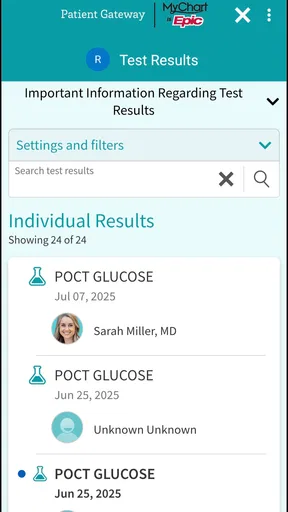
Patient Gateway may provide access to test results, allergies, medications, immunizations, diagnoses, clinical notes, and other health information, but the exact content depends on your healthcare organization and its release policies. Results can sometimes appear before your clinician has reviewed them, so consider contacting your care team for proper interpretation rather than relying on the app alone.
Can I use Patient Gateway to message my doctor or schedule an appointment?
In many cases, Patient Gateway allows secure communication with participating healthcare teams and may let you request, cancel, or manage appointments. These features are not necessarily available for every provider, department, or appointment type. Messages are intended for routine, non-urgent matters, and responses may not be immediate. For emergencies or serious symptoms, use emergency services instead.
Is Patient Gateway secure, and what should I do if I forget my password?
Patient Gateway is designed to protect health information through account authentication and secure communication, but you should still use a strong, unique password and avoid signing in on shared devices. Enable available security options and keep your contact details current. If you forget your password, use the recovery link on the sign-in screen or contact portal support.


